![GJ-fagbank-logo-2.png]](https://base.gronnjobb.no/hs-fs/hubfs/GJ-fagbank-logo-2.png?height=40&name=GJ-fagbank-logo-2.png)
I need to enter a one-time code, but I can't find it
When you first set up 2FA, you linked an app on your phone to your account at Grønn Jobb. This is the app you will use to find your one-time code. We recommend some of these apps:
Microsoft Authenticator Google authenticator FreeOTP Authenticator


Check if you have one of these apps on your phone and if they show a one-time code.
If you don't have any of these apps on your phone, you most likely set up the link using your phone's camera instead of scanning the QR code with an authentication app. If this is the case, you will need to open your phone's password app and find the code there.
If you are using an iPhone, the app is called "Passwords". You will find the one-time code under "Codes".

If you are using Android, most phone brands have Google's Password Manager as the default app, but some brands may have their own solution. Open the app and find the login for Grønn Jobb. The one-time code should be displayed there.
.png?width=81&height=81&name=unnamed%20(1).png)
Activate a new link
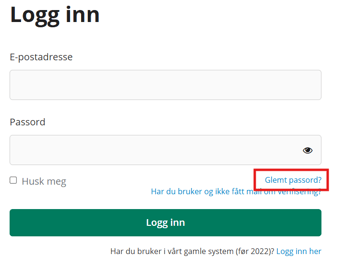
You can always click “Forgot your password?” on the login page if you can’t find the 2FA link you set up, or if you no longer have access to it. You will then receive an email with a link. When you click the link, you will need to set up a new 2FA link before you can choose a new password. Once you have done this and are logged in, you can remove the old link in the same way as described under “I want to change my verification app”.
I have a new phone
Most authentication apps will save your login information if you have enabled sync or backup. If this is the case, you can download the app on your new phone and log in or restore your backup. The one-time codes will then be available there.
If you have not enabled sync or backup, you can follow the steps described above under "Activating a new link".
I want to change the verification app
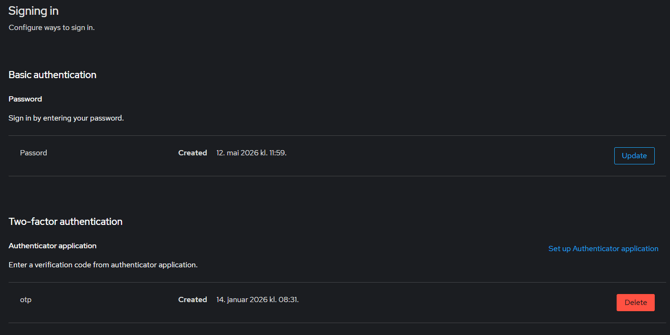
You can delete your own 2FA link when you are logged in to the system.
Click on your profile in the top right corner, and then select "Change password".
You will be directed to a page where you can change your password and remove the existing 2FA link. If you delete the link, you will need to create a new one the next time you log in. You can then scan the QR code with the app you want to use.
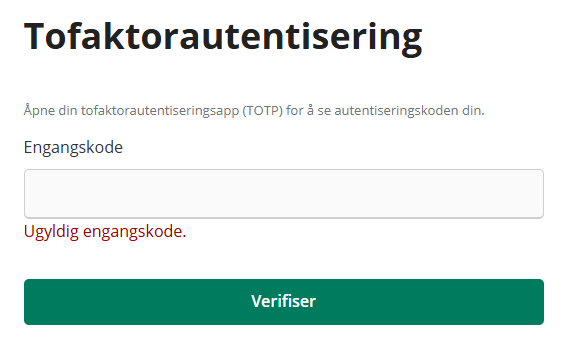
I get an "invalid one-time code" when I try to log in
If you get this error message when you enter your code, it means that the wrong code is being used. For example, this can happen if you have set up 2FA for multiple sites in different apps, or in the same app, and you accidentally enter one of the other codes.
Most apps allow you to name what the codes will be used for. Therefore, we recommend that you give the code a name that makes it easy to recognize which service it belongs to.
I'm trying to start the Hot Work Course, but I'm getting an error message
If you've just enabled 2FA to take the Hot Work Course, some users may experience an error message when they try to start the course.
If this happens, you need to log out of the system completely, wait 5 minutes, and then try to log in again.
Sometimes the system takes a few minutes to update the settings. Therefore, if you try to start the course too early, it may not work.