![GJ-fagbank-logo-2.png]](https://base.gronnjobb.no/hs-fs/hubfs/GJ-fagbank-logo-2.png?height=40&name=GJ-fagbank-logo-2.png)
As a customer, you can terminate the agreement you have entered into with us at Grønn Jobb, if you no longer wish to use our product. To terminate a product, you must send an email to post@gronnjobb.no and tell us which product you wish to terminate. The termination period can be found in the contract for the product you have purchased. The contract can be found in the system under the menu option Contract, or by clicking here.
When a product is terminated we will register an expiry date for the product, based on the terms of the agreement. The administrator can see this expiry date if they go to company settings and look at the overview for products and licenses.
When the expiry date has passed, the licenses for the product are removed from your company and your users. This means that none of the company's employees will be able to log into the system. The exception is the person registered as main administrator, who will be allowed to keep their license for 3 months after the expiry date, in order to retrieve data stored in the system. After these months, all data belonging to the product is permanently deleted.
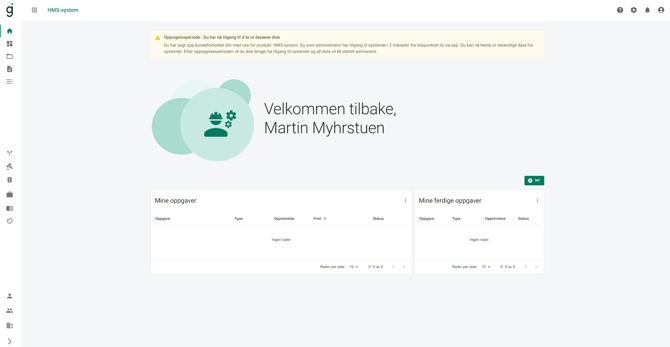
If, for example, you have terminated the HSE system, the expiry date has passed and only the main administrator has access, a message will appear on his front page when he goes to the HMS system. When the 3 extra months have passed after the expiry date, the license of the main administrator will also be removed and all data stored in the HSE system will be permanently deleted.
If you have purchased several of our products and only terminate one of them, you will still have all licenses for the product you did not terminate. All employees will still be able to log in and see the products that have not been terminated, but will not be able to go to the product that has been terminated. The main administrator will be able to access the product for 3 months after the expiry date, and will then receive the message as described earlier.