![GJ-fagbank-logo-2.png]](https://base.gronnjobb.no/hs-fs/hubfs/GJ-fagbank-logo-2.png?height=40&name=GJ-fagbank-logo-2.png)
For managers
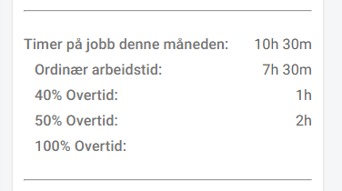
When a manager or other person in charge approves hours, an overview is displayed at the bottom, where you can see the total number of hours in each category. Here you can also see the paid hours. Paid hours will often be equal to "total hours", but can also differ. This depends on the settings the administrator in the company has chosen, and how the employees have registered their time.
The administrator can choose whether breaks should be paid or not, with two different settings: breaks during regular working hours and breaks during overtime. The default setting is that breaks during regular working hours are not paid, while breaks during overtime are paid.
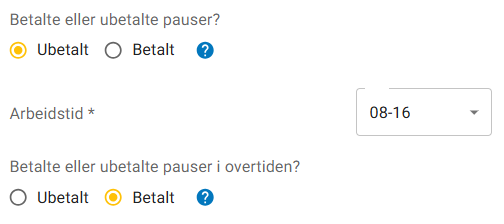
When employees register working hours, they also register breaks, and then choose whether the break was taken during regular working hours or during overtime. If the setting is the same as in the image above, all breaks registered during overtime will automatically be registered as paid within the selected overtime type. The break will thus be part of the overtime hours.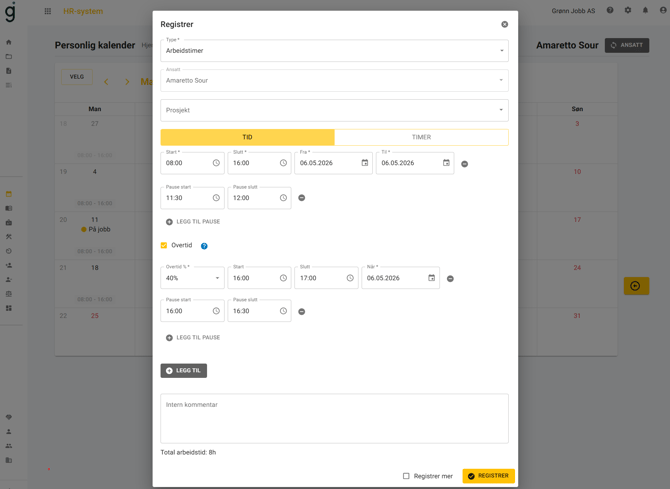
If you change the setting, it will not have any effect on already registered working hours. If you update existing registrations or register new ones, the new setting will take effect.
If you choose to download the timesheet as a PDF, you will first get an overview of paid working hours in the selected period, followed by a list of all time registrations. In the overview of paid working hours, paid breaks will be included in the time on the wage type the breaks are registered on. If you download the timesheet as a CSV file, each line will show both the number of working hours and the number of paid hours.
For employees
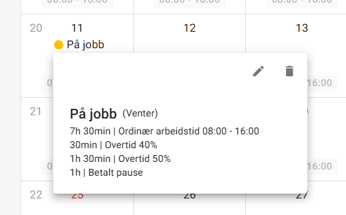
In the personal calendar, the employee can see how much of the break has been paid by clicking on the individual registration. The summary to the right of the calendar shows all paid time, divided into the different wage types.